Big documents and long lists
On this page
Most software projects start with an idea, and then the idea becomes a document, usually a big one. It goes by different names: technical specification, product requirements document (PRD), functional spec, business requirements document (BRD), or even the "Project Phoenix" doc. Whatever it's called, it's typically written by one or two people, either a business analyst or product manager. From there, it's enhanced with design mockups and eventually distilled into a backlog of tickets. This page looks at the problems with that process.
Problem 1: Same words, different interpretations
The people who write the document put days into it: what the product should do, who it's for, the acceptance criteria, the business case and how success will be measured. Most of the team will read it, but each person comes away with their own mental picture of the product. That's usually where things start to go wrong.
Here are a few examples of how written requirements can sometimes be interpreted differently to how the writer intended.
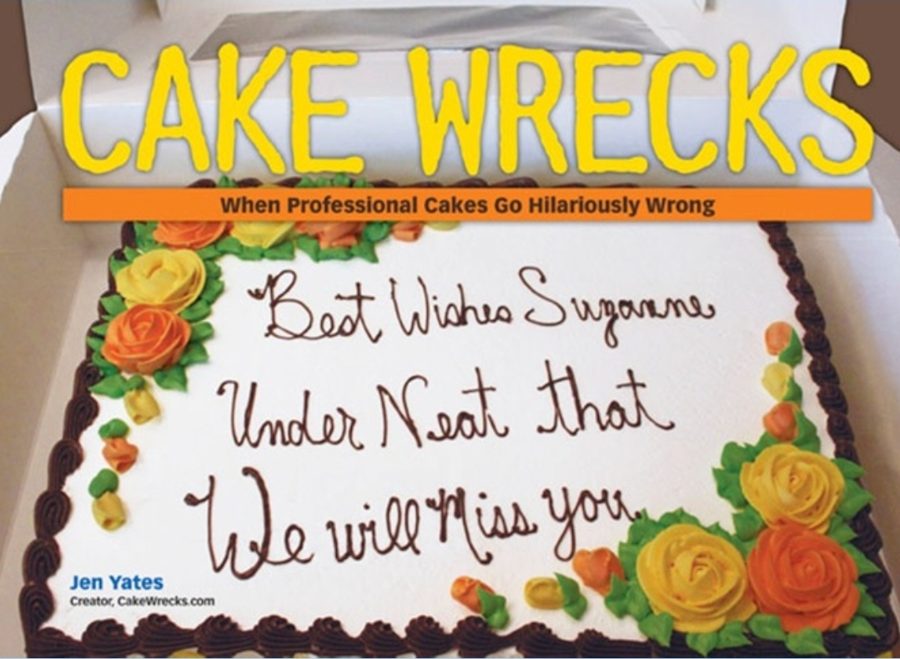
Someone once ordered a leaving cake that said "Best Wishes Suzanne" and, underneath that, "We will miss you". Someone else read those requirements. The result:
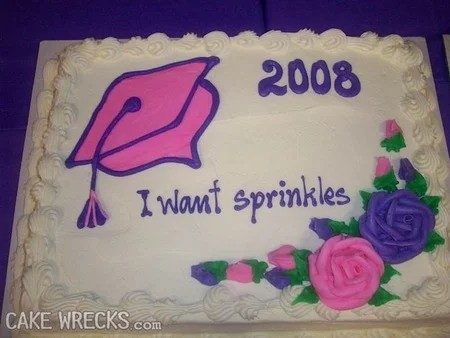
Someone else wrote on a graduation cake order that they wanted sprinkles. The baker read those requirements too. The result:
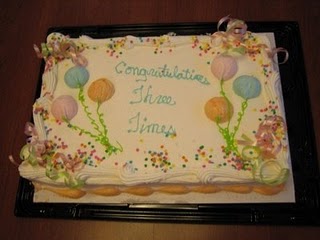
A mum-to-be was having triplets, so the order asked for "Congratulations" to be written on the cake three times. The result:
A birthday cake order came with a note for the bakery: nuts allergy. The result:

All four bakeries read the words exactly as they were written. The writers intended them to be interpreted differently. I mean, they were clear requirements, right?
A long software project document does the same thing on a bigger scale. A typical project document can run to tens of pages, sometimes hundreds, covering many topics for different audiences, at varying levels of detail. Everyone is asked to review it, to confirm its correctness, and usually, after some of them have read it, it's finalised and approved by everyone.
✓ Product✓ Design✓ Engineering✓ Marketing✓ Leadership
50 pages, read and approved by five teams. Did they all really read it and understand it?
The truth is, people read documents in different ways. Some skim. Some read half, feel they have the idea, and move on. Others read it over in a few sittings. The approvals hide the differences. Design pictures one app, engineering visualises another, leadership expects a third, and the gaps turn up once the work starts.
The research backs this up:
- Same words, different meanings. 104 software practitioners read the same 12 "if/then" requirements and disagreed about what they meant, even when they knew how the system behaved.
- Writers overestimate how clear they are. In a study of email, senders expected 78% of readers to tell whether their message was serious or sarcastic. Only 56% could.
- Long documents get skipped. In a study of terms of service, 98% of students agreed to them without noticing a clause that handed over their first-born child!
Note. The project document starts as the reference, but over time people check it less often, and the tickets take over.
Problem 2: The list with no story
Sooner or later, the document becomes a backlog of tickets. Here's the backlog for our example coffee ordering app.
- COF-1Credit card
- COF-2Search by name
- COF-3Gift cards
- COF-4Choose size
- COF-5Drink list with prices
- COF-6Edit or remove items
- COF-7Group ordering
- COF-8Apple Pay / Google Pay
- COF-9Select milk type
- COF-10Save custom drinks
- COF-11Submit order
- COF-12Add multiple drinks
- COF-13Split payment
- COF-14Extra shots and syrups
- COF-15Recommend popular combos
- COF-16Photo on each drink
- COF-17Order summary with total
Try answering these questions from the list of tickets:
- In what order will a customer use these?
- How many sprints until a customer can order a coffee?
- What's missing? (Something is.)
It's hard. This is a typical backlog for a new project: the document boiled down into things to build, from user requirements to good ideas. The list says what to build, not where each piece fits or how the pieces add up to something people can use. Sorting it by priority doesn't help much. It changes the order, not the picture.
Jeff Patton came up with user story mapping because a flat backlog can't show how a product fits together. Of flattening the plan into a list, he wrote: "we pull all the leaves off the tree and load them into a leaf bag – then cut down the tree." (The new user story backlog is a map, Jeff Patton.) A story map keeps the tree: the team maps the journey together, spots the gaps, and slices out a first release that works from start to finish. The backlog comes straight from the story map, already in order.
Tell it as a story
A story map puts the same work on one page, as a story anyone can read in a couple of minutes. The team builds it together, so different pictures of the product come out in the conversation, before the work starts.
Over the next section, you'll see this backlog turn into one, and these questions get answered.
Note. User story mapping was created by Jeff Patton, who wrote the book on it, User Story Mapping. There's more on his site.